Mobile OCR workflow for teachers to produce print-ready exam papers
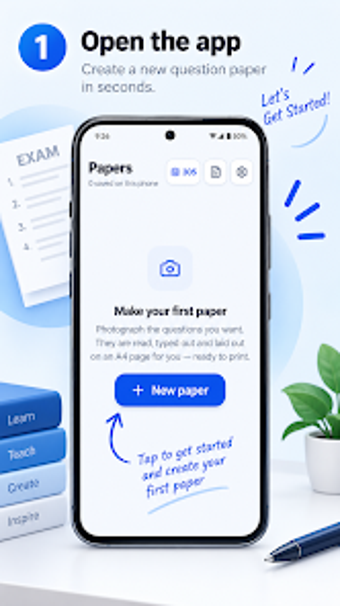
Scans printed textbook pages with a phone camera, extracts questions using OCR, and assembles them into A4 PDF exam sheets. Developed by appcraftstudio for Android, the app targets school teachers, tutors, and homeschooling parents. It offers header branding, diagram cropping with ink-cleaning, LaTeX-style typesetting, and offline PDF export. Ideal for educators who need locally stored, camera-driven paper generation without account sign-up.
How it captures and converts printed questions
Exam Paper Maker uses mobile OCR to read printed questions directly from a camera feed, including multiple-choice questions and nested sub-parts, so teachers do not have to retype content. The scanner handles printed English and several Indian languages, and the app lets users photograph diagrams for inclusion. These capabilities focus on converting physical textbook or past-paper pages into editable text on the device.
How it produces formatted, print-ready exam output
The app applies LaTeX-style typesetting to lay out extracted questions onto A4 pages with margins, headers for school name, class and subject, and marks allocation. Users can crop and insert figures, and export the result as a high-quality PDF suitable for printing or sharing through messaging apps. The tool automates page composition so the final files are immediately usable in classroom workflows.
Where it fits in classroom workflows and privacy practices
The developer designed the app with local-first storage and no account requirement, so all papers save on the device and no cloud storage is necessary. Offline functionality lets teachers build and save exams without a constant internet connection. The app’s language recognition for English plus Indian languages addresses regional classroom needs where textbooks are printed in multiple scripts.
Operational limits and practical setup for educators
The application is optimized for smartphones and tablets, with system requirements varying by device, so performance depends on hardware. New users receive five free pages for testing. As an indie product from a small studio led by Riyas, the app emphasizes a compact, privacy-focused workflow rather than broad integrations with external document services.
Exam Paper Maker suits teachers who prioritise speed and local control
For classroom teachers and tutors who want quick, on-device conversion of printed materials into exam documents, this app provides a focused workflow and local storage. Expect some practical limits, such as the initial five test pages and dependence on device performance for complex scans. The app works best for educators who value privacy and a camera-first approach over cloud collaboration.